
CARFAX Car Care App
CARFAX, IncAuto & Vehicles
4.77.62K Reviews
- Version
- 5.4.0
- Installs
- 1.00M
- Age Rating
- Everyone
Screenshots
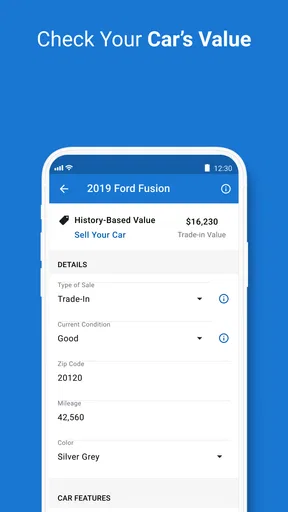
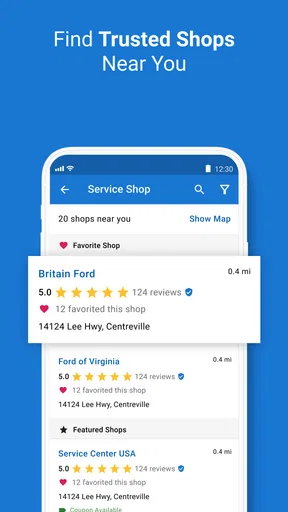
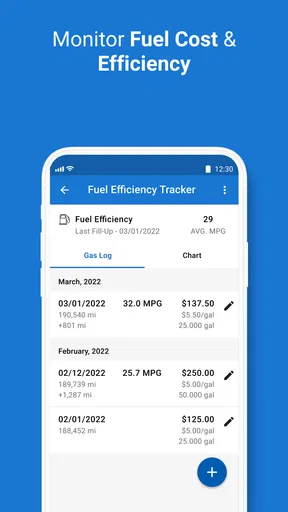
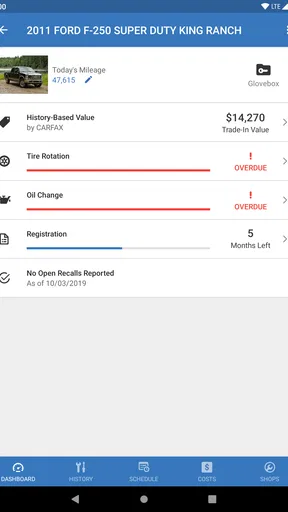
Our Review of CARFAX Car Care App
 Analysis by Appyee
I like car apps that solve a specific problem instead of trying to replace every tool in my life. CARFAX Car Care App takes that focused approach: it gives me a practical place to follow a vehicle’s service history and keep an eye on upcoming maintenance. That sounds simple, but it addresses a familiar source of stress. Many drivers remember that a repair happened, yet cannot remember exactly when, what was replaced, or whether the next service is approaching.
Developed by CARFAX, Inc, this free app sits in the Auto & Vehicles category and is suitable for everyone. It has been available since September 2012, and its current version is 5.1.0. The app has built a strong audience, with an average rating of 4.8 from around 43 thousand ratings and more than a million installs. Those figures do not make it automatically perfect, but they do suggest that its central idea is useful to a lot of drivers.
How CARFAX Car Care fits into everyday vehicle ownership
My first impression is that this is less of a driving companion and more of a maintenance memory. I would open it when I want to understand what has already been done to a car, or when I need a clearer answer to the question, “What should I take care of next?” That makes it particularly helpful for people who own an older vehicle, share a car with family members, or have recently bought a used car and want to establish a dependable routine.
The main value is not simply seeing a list of workshop visits. The useful part is connecting past service records with future decisions. A record can help me avoid requesting the same work twice, recognize that a recurring maintenance item may be due, and speak more confidently with a mechanic. It also gives me something more concrete than a glove-box full of faded invoices.
A realistic example is a family car used by several people. One person takes it in for an oil service, another notices a warning light, and a third drives it most of the week. Without a shared record, everyone may have a different idea of what was done. Keeping the vehicle’s maintenance information in one app gives the household a common reference point. It does not replace the mechanic’s inspection, but it can make the conversation more organized.
A better starting point after buying a used car
Used-car ownership is where I see the strongest reason to try this app. When I buy a vehicle privately or from a seller, I may receive incomplete paperwork. Even when the car comes with a service folder, the information can be difficult to interpret quickly. A digital maintenance view helps me turn that scattered background into a checklist: what appears to have been handled, what deserves verification, and what I should ask about at the next appointment.
There is an important trade-off here. A service history is useful only when it is complete and accurate enough to guide a decision. I would not treat a missing entry as proof that work never happened, and I would not treat a listed entry as proof that a component is still in perfect condition. The app is best used as an organized record, not as a substitute for invoices, inspection results, or professional advice.
One practical habit is to review the vehicle before contacting a repair shop. I can note the last known service, gather questions, and avoid relying on memory while standing at the counter. That small preparation can make an appointment faster and reduce the chance of agreeing to work simply because I cannot remember whether it was already completed.
What the current version means for existing users
The current release is version 5.1.0, which gives existing users a clear point of reference when checking that their installation is up to date. I would not read the version number alone as evidence of a dramatic redesign. What matters more is whether the app continues to make its core tasks easy: finding a vehicle’s records, understanding maintenance timing, and returning to that information without unnecessary effort.
For someone already using the app, the sensible approach is to keep the vehicle information tidy and review it before important ownership moments. That includes a long trip, a change of driver in the household, a planned sale, or a visit to a new repair shop. The benefit grows over time because a maintenance record becomes more useful when it is consulted regularly rather than forgotten until a warning appears.
The app’s long presence on mobile, beginning in 2012, also matters in a practical way. It is not a brand-new experiment built around a temporary trend. Still, longevity should not create false confidence: cars, repair practices, and mobile operating systems change. I would judge each update by how well it preserves clarity and reliability for the everyday tasks I actually need.
Where it is stronger than the usual alternatives
The usual alternative is a paper folder, a notes app, or a spreadsheet. Paper can hold invoices, but it is awkward when I am away from home and difficult to search. A notes app is flexible, yet it usually depends on me creating a structure from scratch. A spreadsheet can be powerful for an enthusiast, but it may feel like too much work for someone who simply wants to know when maintenance is due.
CARFAX Car Care has an advantage because it is built around the vehicle rather than around a blank document. That focus makes it easier to think in terms of ownership history and upcoming service. I do not have to invent column names or decide how to format every entry before I can get value from the record.
It can also be more approachable than a full vehicle-management system. A detailed spreadsheet may let me track fuel economy, tire rotation, parts costs, and resale notes with great precision. If that level of control is important to me, a spreadsheet or dedicated enthusiast log may be better. This app makes more sense when the priority is a clean maintenance overview rather than a complete automotive database.
Three workflows that make the app more useful
First, use it as a pre-appointment briefing. Before calling a shop, I would check the recent history and write down the maintenance questions that follow from it. If the history shows repeated attention to one area, I can ask the technician to inspect it carefully rather than describing the problem vaguely. This does not tell me what repair is necessary, but it helps me arrive prepared.
Second, use it during a change of ownership. When a car moves from one family member to another, the app can serve as a shared reference instead of leaving the new driver dependent on verbal explanations. I would still pass along receipts and keys, but the digital record provides a more convenient starting point for understanding the vehicle’s routine.
Third, use it to separate “due soon” from “already handled.” Many maintenance mistakes happen because drivers remember a recommendation but forget whether they acted on it. I find it useful to check the record after a service visit, while the details are still fresh. That creates a habit of closing the loop instead of carrying uncertain reminders for months.
These workflows also show the app’s limitation: it is only as useful as the information available to it and the care I take in keeping my own vehicle context clear. I would not use it as permission to ignore unusual sounds, dashboard warnings, fluid leaks, or a mechanic’s direct findings.
Questions I would ask before relying on it
Can it replace a mechanic? No. Its role is organization and maintenance awareness. A maintenance record can point me toward a conversation, but it cannot inspect brakes, judge a tire’s condition, diagnose a noise, or confirm that a repair was completed correctly. If the car behaves unusually, I would seek professional attention regardless of what the app shows.
Is it useful for a car with little recorded history? Yes, but with a different expectation. I would treat the first use as a baseline-building exercise rather than assuming the app can reconstruct every event in the vehicle’s life. I could begin recording what I know, keep supporting paperwork, and use future visits to create a more dependable picture.
Is it a good choice for someone who wants detailed cost analysis? Probably not as the only tool. Drivers who want elaborate expense categories, fuel calculations, custom reminders, or component-level tracking may prefer a spreadsheet or a more specialized log. The appeal here is the maintenance record and due-service perspective, not unlimited customization.
Can a new driver use it comfortably? The Everyone rating and focused purpose make it approachable, especially for someone who does not want to learn a complicated automotive system. I would still recommend spending a few minutes understanding the vehicle record before an urgent situation arises. Familiarity matters more than technical knowledge when the goal is simply to make better maintenance decisions.
Does the free price change the decision? It makes trying the app easy, especially for a driver who currently relies on memory or paper. Free does not mean I should expect every possible ownership tool in one place, though. I would install it for its central job and keep another method for anything it does not cover well.
Remaining gaps and points of friction
The biggest conceptual gap is the difference between recorded maintenance and actual vehicle condition. An app can help me remember a service interval, but a car does not always follow a neat calendar. Driving conditions, mileage, weather, vehicle age, and the quality of previous work all affect what deserves attention. I would use the app to prompt questions, not to make mechanical judgments without context.
Another possible friction point is incomplete history. A driver who expects a perfect archive immediately may be disappointed if older work was performed outside the records they can access or remember. The right mindset is to build confidence gradually. I would compare the app’s information with paperwork, receipts, and the repair shop’s records whenever those sources are available.
There is also a behavioral limitation: maintenance apps help most when I open them consistently. If I only look at the record after a problem appears, I lose much of the preventive value. My recommendation is to check it at natural moments, such as before a seasonal trip, after a service visit, or when another person begins driving the vehicle regularly.
Drivers with several vehicles should think about how much detail they really want to maintain. The app’s vehicle-centered approach can be convenient for a household, but managing multiple cars still requires discipline. I would give each vehicle a quick review rather than assuming that one general reminder applies equally to all of them.
What I would watch as the app evolves
For future updates, I would pay attention to improvements that make records easier to understand without making the interface busier. Clear maintenance timelines, straightforward due-service explanations, and dependable access to vehicle information would matter more to me than decorative changes. The best evolution would preserve the app’s simple purpose while helping users distinguish confirmed history from items that still need attention.
I would also watch how well the experience serves both new owners and long-time users. A new owner needs a gentle way to establish a baseline, while an experienced user needs quick access to familiar records. If updates add complexity, the app could lose the everyday convenience that makes it more attractive than a spreadsheet. If they improve organization without adding friction, existing users should benefit immediately.
Because the app has a 4.8 average and around 43 thousand ratings, expectations are understandably high. I would still focus on practical reliability rather than popularity. A strong reputation is encouraging, but my own test would be simple: can I find the information I need before a service visit, understand what deserves follow-up, and return to the record later without confusion?
My recommendation for different kinds of drivers
I would recommend CARFAX Car Care to a driver who wants a dedicated maintenance home but does not want to build a spreadsheet. It is especially sensible for used-car owners, families sharing a vehicle, and people who often forget when routine work was last completed. The free price lowers the barrier to testing it, and the Everyone age rating makes it suitable for a broad household audience.
I would be more cautious for automotive enthusiasts who want deep customization, detailed spending reports, or a complete log of every modification and fuel stop. A spreadsheet or specialized enthusiast tool may offer more control. I would also avoid depending on this app alone when buying a vehicle, diagnosing a fault, or deciding whether a repair is safe to postpone.
My overall view is positive because the app addresses a real ownership problem with a focused solution. It does not need to pretend to be a mechanic or a full automotive command center. Its best role is helping me turn scattered service information into something I can use before the next appointment. If I want a practical maintenance memory rather than an elaborate car-management system, this is an easy app to recommend.
After using it, my advice is to start with one vehicle, compare the information with whatever paperwork you already have, and make a habit of checking the record at sensible ownership milestones. That approach keeps expectations realistic and lets the app do what it does best: help me remember, prepare, and stay more organized about the car I depend on.
Privacy and Permissions
See what permissions an app requests and how it handles your data.
- Location
- approximate location (network-based), precise location (GPS and network-based)
- Camera
- take pictures and videos
- Wi-Fi connection information
- view Wi-Fi connections
- Other
- view network connections, full network access, run at startup, draw over other apps, prevent device from sleeping
Verdict
Strengths of CARFAX Car Care App
- Tracks maintenance, repairs, recalls, and service history in one place.
- Vehicle profiles help manage multiple cars from a single account.
- Maintenance reminders can reduce the risk of missed routine services.
- VIN-based information makes it easier to identify vehicle-specific issues.
- Service records can support better resale preparation and ownership planning.
Limitations of CARFAX Car Care App
- Some features may require a paid CARFAX subscription or partner services.
- Data may be incomplete when shops or owners have not reported service records.
- Repair estimates and maintenance costs can vary by location and provider.
- The app’s value is limited for older vehicles with little digital history.
- Frequent notifications may feel excessive if reminders are not customized.
Other Releases by CARFAX, Inc
View All
CARFAX - New & Used Cars
Auto & Vehicles4.7
Similar Picks in This Category
View All
Android Auto
Google LLC4.1

maxim — order a taxi & food
PT. SITO4.7

Штрафы ГИБДД: проверка с фото
Pays LLC – Штрафы ГИБДД4.7

Номерограм – проверка авто
Авто Ассист4.8

Дром Авто
Дром4.9

Frequently Asked Questions
What is the CARFAX Car Care app used for?
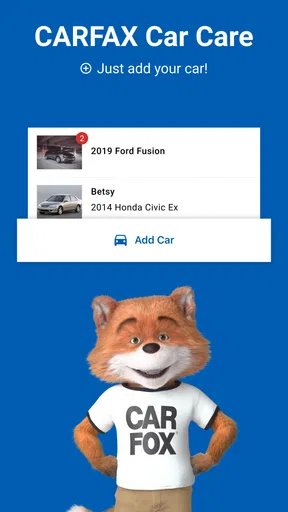
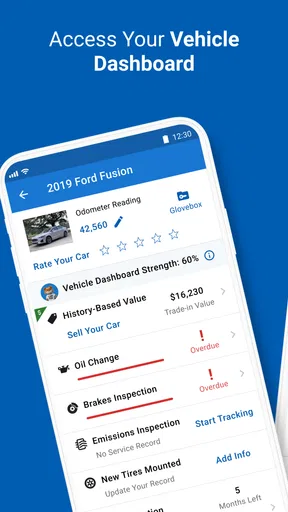
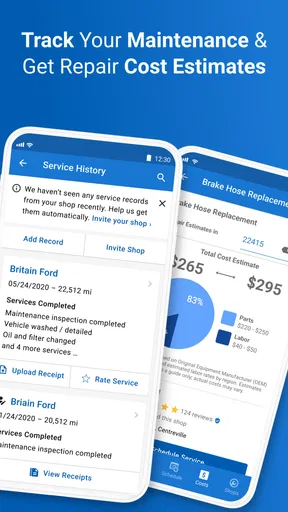
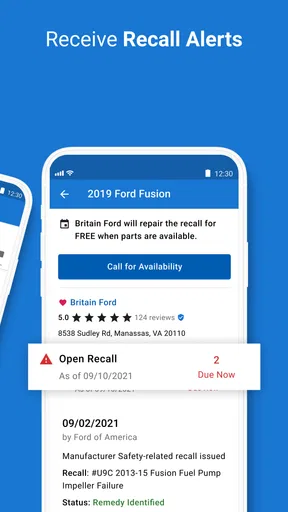
CARFAX Car Care is designed to help you organize and monitor your vehicle’s maintenance history. After adding a car, you can review available service records, receive maintenance reminders, track recalls, and keep important vehicle information in one place. It is especially useful for owners managing several cars or trying to understand a used vehicle’s past before making maintenance decisions.
Is CARFAX Car Care free to download and use?
The app is generally available to download at no cost, and many of its basic vehicle-management features can be used for free. However, certain CARFAX services, reports, or optional products may require payment. Before purchasing anything, check the current pricing and subscription details shown in the app or on the official CARFAX website, since available features and prices may vary by location.
How accurate is the maintenance history shown in CARFAX Car Care?
The maintenance information displayed in the app depends on records reported by participating service centers, dealerships, inspection facilities, and other data providers. It can be helpful, but it may not include every oil change, repair, or privately completed service. For the most complete history, compare the app’s records with invoices, workshop receipts, and documentation supplied by the previous owner.
Can I use CARFAX Car Care to track recalls and maintenance reminders?
Yes, the app can help you stay informed about reported recalls and upcoming maintenance needs for vehicles added to your account. Reminders may be based on mileage, time intervals, or information associated with the vehicle. They should be treated as helpful guidance rather than a replacement for the owner’s manual or a professional mechanic’s inspection, particularly when warning lights or safety concerns appear.
What information do I need to add my vehicle to CARFAX Car Care?
You will typically need identifying details for the vehicle, such as its license plate information, vehicle identification number, or other requested registration data, depending on the app’s instructions and your region. You may also need to create or sign in to a CARFAX account. Enter the information carefully, because an incorrect VIN or plate number can display records for the wrong vehicle.
